Game Engine Architecture - ECS
Entity Component System
지난 포스트는 ALEngine의 입력 이벤트 시스템에 대해 글을 썼었다. 오늘은 ALEngine의 아키텍처 패턴인 Entity Component System에 대한 포스트를 적으려고 한다.
게임이나 복잡한 시뮬레이션 시스템을 개발하다 보면, 수많은 객체들이 서로 다른 행동과 상태를 가져야 할 때가 있다. 처음에는 상속과 다형성으로 구조를 짜기 시작하지만, 시간이 지날수록 클래스의 계층이 복잡해지고 비슷한 기능을 가진 객체들이 서로 얽히면서 유지보수가 어려워진다.
이런 문제를 해결하기 위한 방안으로 ECS(Entity Component System) 패턴을 사용할 수 있다. ECS는 객체의 상태(Component)와 행동(System)을 분리함으로써 코드의 유연성과 재사용성을 극대화하고, 데이터 중심으로 설계되어 성능까지 챙길 수 있는 구조다. 이번 포스트에서는 OOP 방식이 가진 구조적 한계를 짚어보고, ECS가 어떻게 그것을 해결하며, 실제로 어떤 방식으로 구성되고 동작하는지 살펴보려고 한다. 또한 ALEngine에서 ECS를 어떻게 활용했는지에 대해 설명할 것이다.
OOP와 ECS의 비교
전통적인 객체지향(OOP) 방식에서는 객체가 상태(state)와 행동(behavior)을 함께 갖는다.
예를 들어 Player 클래스는 position, health 같은 상태와 Move(), Attack() 같은 메서드를 동시에 포함한다.
OOP 구조 예시
class Player {
    Vector2 position;
    int health;

    void Move(Vector2 direction) {
        position += direction;
    }

    void TakeDamage(int damage) {
        health -= damage;
    }
}
이 방식은 소규모 프로젝트에서는 직관적이고 빠르게 구현할 수 있지만, 규모가 커질수록 클래스 간 상속 관계가 복잡해지고, 중복 코드가 늘어나 유지보수가 어려워진다.
ECS방식은 어떻게 다를까?
ECS에서는 객체(Entity)는 단순한 ID일 뿐이며, 상태는 Component로, 행동은 System으로 분리된다.
// Component 구조체 정의
struct Position {
    float x, y;
};

struct Velocity {
    float dx, dy;
};

// Entity 구조 예시
struct Entity {
    int id;
    Position* position;
    Velocity* velocity;
};

// System 함수: 상태를 바꿈
void MovementSystem(std::vector<Entity>& entities) {
    for (auto& e : entities) {
        if (e.position && e.velocity) {
            e.position->x += e.velocity->dx;
            e.position->y += e.velocity->dy;
        }
    }
}
Unity에서는?
Unity는 최근 DOTS(Data-Oriented Tech Stack)를 통해 ECS 아키텍처를 도입하고 있다.
// Component 예시
public struct Position : IComponentData {
    public float3 Value;
}

// System 예시
public partial struct MovementSystem : ISystem {
    public void OnUpdate(ref SystemState state) {
        foreach (var (position, velocity) in SystemAPI.Query<RefRW<Position>, RefRO<Velocity>>()) {
            position.ValueRW += velocity.ValueRO;
        }
    }
}
기존의 MonoBehaviour 기반 구조보다 훨씬 더 성능 중심적이며, 수천 개의 오브젝트를 동시에 다뤄야 하는 상황에서 강력한 퍼포먼스를 발휘한다.
ECS 성능이 뛰어난 이유: 캐시 친화적 구조
Sparse Set
ECS는 Sparse set을 이용해 데이터를 캐시 친화적으로 저장해 놓는다.
Sparse Set은 두 개의 배열로 구성된다:
-
Sparse Array: 엔티티 ID를 인덱스로 사용하여, 해당 엔티티의 위치를 Dense 배열에서 찾을 수 있도록 한다.
-
Dense Array: 실제 컴포넌트 데이터를 연속된 메모리 블록에 저장한다.
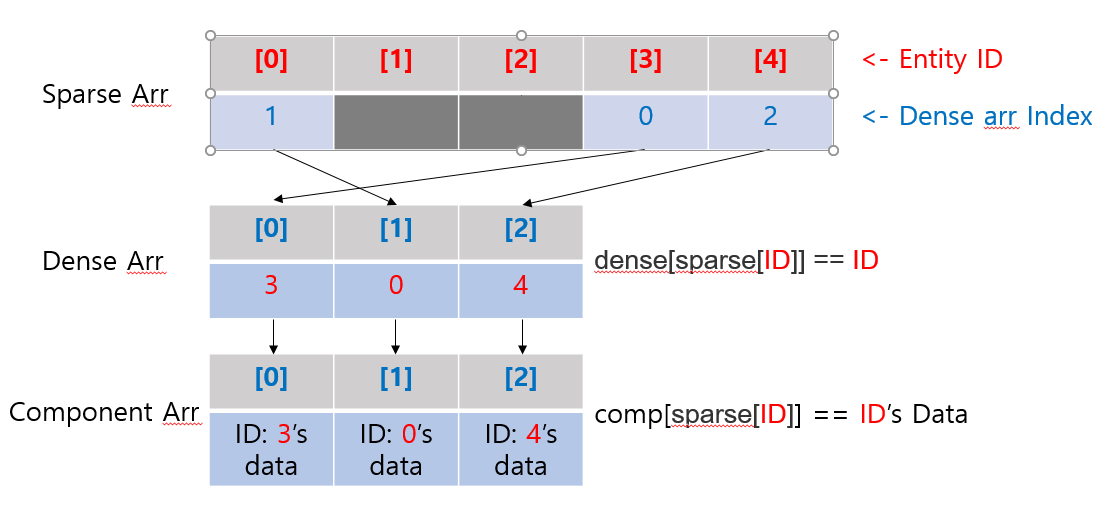
이 구조를 통해 다음과 같은 성능상의 이점을 얻을 수 있다:
- 조회: 엔티티 ID를 통해 컴포넌트를 빠르게 조회할 수 있다.
bool contained = (dense[sparse[element]] == element);
- 추가: O(1)의 시간 복잡도로 요소를 추가할 수 있다.


const auto pos = dense.size();
dense.push_back(element);
sparse[element] = pos;
- 삭제: O(1)의 시간 복잡도로 요소를 삭제할 수 있다.

const auto last = dense.back();
swap(dense.back(), dense[sparse[element]]);
swap(sparse[last], sparse[element]);
dense.pop_back();
ALEngine의 ECS
지금까지 ECS를 OOP에 비교해 왜 성능상 좋은지에 대해 설명했다. ALEngine은 Unity 엔진 처럼 구현하는 것이 목표였고, ECS의 성능상 이점을 가져가고자 ECS를 도입했다. EnTT라는 ECS를 잘 구현한 라이브러리를 사용했다. 먼저 객체를 기본적으로 표현할 수 있는 Component들을 정의했다.
Component
/**
 * @struct IDComponent
 * @brief 개체(Entity)의 고유 ID를 저장하는 컴포넌트.
 */
struct IDComponent
{
	UUID m_ID;

	IDComponent() = default;
	IDComponent(const IDComponent &) = default;
};

/**
 * @struct TagComponent
 * @brief 개체(Entity)의 태그(이름) 및 활성 상태를 저장하는 컴포넌트.
 */
struct TagComponent
{
	std::string m_Tag;
	bool m_isActive = true;	  // 에디터 상 활성 여부
	bool m_selfActive = true; // 부모와 관계없이 자신의 활성 여부

	TagComponent() = default;
	TagComponent(const TagComponent &) = default;
	TagComponent(const std::string &tag) : m_Tag(tag)
	{
	}
};

/**
 * @struct TransformComponent
 * @brief 개체의 위치, 회전, 크기 정보를 저장하는 컴포넌트.
 */
struct TransformComponent
{
	// 속성
	alglm::vec3 m_Position = {0.0f, 0.0f, 0.0f};
	alglm::vec3 m_Rotation = {0.0f, 0.0f, 0.0f};
	alglm::vec3 m_Scale = {1.0f, 1.0f, 1.0f};
	alglm::vec3 m_LastPosition = {0.0f, 0.0f, 0.0f};
	alglm::vec3 m_LastScale = {0.0f, 0.0f, 0.0f};

	bool m_isMoved = false;

	alglm::mat4 m_WorldTransform = alglm::mat4(1.0f);

	// 생성자
	TransformComponent() = default;
	TransformComponent(const TransformComponent &) = default;
	TransformComponent(const alglm::vec3 &position) : m_Position(position), m_LastPosition(position)
	{
	}

	alglm::mat4 getTransform() const
	{
		alglm::mat4 rotation = alglm::toMat4(alglm::quat(m_Rotation));

		return alglm::translate(alglm::mat4(1.0f), m_Position) * rotation * alglm::scale(alglm::mat4(1.0f), m_Scale);
	}

	float getMaxScale()
	{
		return std::max(m_Scale.x, std::max(m_Scale.y, m_Scale.z));
	}
};
이 Component들은 Entity가 생성되면 항상 생기는 정보이다. ID는 Entity가 가지고 있는 고유한 uint64 값이다. Tag는 Entity의 이름과 에디터상 활성화 여부에 대한 정보가 담겨있다. Transform은 Entity의 위치, 회전, 크기에 대한 데이터이다.
Component들을 구조체로 구현한 이유는 구조체가 데이터만을 표현하기 위한 적절한 수단이기 때문이다. 물론 TransformComponent를 보면 getTransform이나 getMaxScale같이 데이터들을 기반으로 계산해주는 함수가 있지만, 이는 필요에 의해 만들어진 것이지 결국에 Transform은 데이터 그 자체이다. 구조체 대신 클래스로 구현하면 상속 관계 때문에 메모리 정렬의 예측이 어려워지고, 그러면 ECS의 성능상의 이점을 누릴 수 없게 된다.
이외에 Entity를 렌더링하기 위한 데이터, 물리 연산을 하기 위한 데이터, Entity 간 관계를 정의하는 데이터 등 여러 데이터들을 정의했다.
/**
 * @struct MeshRendererComponent
 * @brief 메시 렌더링을 위한 컴포넌트.
 */
struct MeshRendererComponent
{
	std::shared_ptr<RenderingComponent> m_RenderingComponent;
	uint32_t type;
	std::string path = "";
	std::string matPath = "";
	bool isMatChanged = false;

	// Culling
	int32_t nodeId = NULL_NODE;
	CullSphere cullSphere;
	ECullState cullState;

	MeshRendererComponent() = default;
	MeshRendererComponent(const MeshRendererComponent &) = default;
};

struct RigidbodyComponent
{
	// FLAG
	alglm::vec3 m_FreezePos = {1, 1, 1};
	alglm::vec3 m_FreezeRot = {1, 1, 1};

	void *body = nullptr;

	/**
	 * @enum EBodyType
	 * @brief 리지드바디의 유형을 정의하는 열거형.
	 */
	enum class EBodyType
	{
		Static = 0,
		Dynamic,
		Kinematic
	};
	EBodyType m_Type = EBodyType::Dynamic;

	float m_Mass = 1.0f;
	float m_Damping = 0.001f;
	float m_AngularDamping = 0.001f;
	bool m_UseGravity = true;
	int32_t m_TouchNum = 0;

	RigidbodyComponent() = default;
	RigidbodyComponent(const RigidbodyComponent &) = default;
};

/**
 * @struct BoxColliderComponent
 * @brief 박스 콜라이더 설정을 위한 컴포넌트.
 */
struct BoxColliderComponent
{
	alglm::vec3 m_Center = {0.0f, 0.0f, 0.0f};
	alglm::vec3 m_Size = {1.0f, 1.0f, 1.0f};
	bool m_IsTrigger = false;
	bool m_IsActive = false;
	std::shared_ptr<ShaderResourceManager> m_colliderShaderResourceManager;

	float m_Friction = 0.7f;
	float m_Restitution = 0.4f;

	BoxColliderComponent() = default;
	BoxColliderComponent(const BoxColliderComponent &) = default;
};

/**
 * @struct RelationshipComponent
 * @brief 개체 간의 부모-자식 관계를 정의하는 컴포넌트.
 */
struct RelationshipComponent
{
	entt::entity parent = entt::null;
	std::vector<entt::entity> children;

	RelationshipComponent() = default;
	RelationshipComponent(const RelationshipComponent &) = default;
};
Collider 같은 경우는 Collider를 클래스로 추상화하고 Box, Sphere, Capsule, Cylinder가 상속을 받아 구현을 한다면 좋았을 것 같지만 ECS의 원칙에 따라 구조체로 구현했다.
Entity
Entity가 자신이 갖고 있는 Component를 효과적으로 관리하기 위해 addComponent, getComponent, hasComponent, removeComponent 등 여러 기능을 추가했다.
class Entity
{
    // ...

	/**
	 * @brief 새로운 컴포넌트를 추가합니다.
	 * @tparam T 추가할 컴포넌트 타입.
	 * @tparam Args 컴포넌트 생성자에 전달할 인자들.
	 * @param args 컴포넌트 생성자 인자.
	 * @return T& 추가된 컴포넌트의 참조.
	 */
	template <typename T, typename... Args> T &addComponent(Args &&...args)
	{
		T &component = m_Scene->m_Registry.emplace<T>(m_EntityHandle, std::forward<Args>(args)...);
		m_Scene->onComponentAdded<T>(*this, component);
		return component;
	}

	/**
	 * @brief 컴포넌트를 추가하거나 기존 컴포넌트를 교체합니다.
	 * @tparam T 추가 또는 교체할 컴포넌트 타입.
	 * @tparam Args 컴포넌트 생성자에 전달할 인자들.
	 * @param args 컴포넌트 생성자 인자.
	 * @return T& 추가되거나 교체된 컴포넌트의 참조.
	 */
	template <typename T, typename... Args> T &addOrReplaceComponent(Args &&...args)
	{
		T &component = m_Scene->m_Registry.emplace_or_replace<T>(m_EntityHandle, std::forward<Args>(args)...);
		m_Scene->onComponentAdded<T>(*this, component);
		return component;
	}

	/**
	 * @brief 특정 타입의 컴포넌트를 가져옵니다.
	 * @tparam T 가져올 컴포넌트 타입.
	 * @return T& 요청된 컴포넌트의 참조.
	 */
	template <typename T> T &getComponent()
	{
		// ASSERT HAS COMPONENT
		return m_Scene->m_Registry.get<T>(m_EntityHandle);
	}

	/**
	 * @brief 특정 타입의 컴포넌트를 제거합니다.
	 * @tparam T 제거할 컴포넌트 타입.
	 */
	template <typename T> void removeComponent()
	{
		// ASSERT HAS COMPONENT
		m_Scene->m_Registry.remove<T>(m_EntityHandle);
	}

	/**
	 * @brief 엔티티가 특정 컴포넌트를 가지고 있는지 확인합니다.
	 * @tparam T 확인할 컴포넌트 타입.
	 * @return true 컴포넌트를 가지고 있음.
	 * @return false 컴포넌트를 가지고 있지 않음.
	 */
	template <typename T> bool hasComponent()
	{
		return m_Scene->m_Registry.all_of<T>(m_EntityHandle);
	}

    // ...
};
Scene의 Registry의 함수들을 사용해 구현했는데, Registry는 entt::registry 라고 EnTT 라이브러리에서 사용하는 EntityID들의 저장소이다. 이를 구현하는 과정에서 까다로웠던 점은 템플릿을 사용해 일반화를 했는데, 생각보다 특수화가 필요한 경우가 많았다. Vulkan 자원을 정리하려면 따로 호출해야하는 함수들이 있었기 때문이다. 자원관리를 어떻게 할지 처음부터 고려하지 않아 생긴 문제였다.
/**
* @brief BoxColliderComponent의 특수화된 삭제 함수.
*/
template <> void removeComponent<BoxColliderComponent>()
{
    // ShaderResourceManager 정리 작업 따로!
    m_Scene->removeColliderShaderResourceManager(*this);
    m_Scene->m_Registry.remove<BoxColliderComponent>(m_EntityHandle);
}
System
Entity 별로 갖고 있는 Component들을 효과적으로 사용하는 System이 필요했다. EnTT의 view 함수를 이용해 Component를 가져왔다.
/**
* @brief 특정 컴포넌트를 가진 모든 엔티티를 가져옵니다.
* @tparam Components 검색할 컴포넌트들.
* @return auto 컴포넌트를 가진 엔티티 뷰.
*/
template <typename... Components> auto getAllEntitiesWith()
{
    return m_Registry.view<Components...>();
}
// Render 함수

// Transform, Tag, MeshRenderer Component를 가져온다.
auto &view = scene->getAllEntitiesWith<TransformComponent, TagComponent, MeshRendererComponent>();
for (auto &entity : view)
{
    // 활성화 버튼이 눌렸거나 MeshType이 None이면 렌더링하지 않는다.
    if (!view.get<TagComponent>(entity).m_isActive || view.get<MeshRendererComponent>(entity).type == 0)
    {
        continue;
    }

    MeshRendererComponent &meshRendererComponent = view.get<MeshRendererComponent>(entity);

    // Cull State를 확인해, 렌더링 대상이 아니면 렌더링하지 않는다.
    if (meshRendererComponent.cullState != ECullState::RENDER)
    {
        continue;
    }
    drawInfo.model = view.get<TransformComponent>(entity).m_WorldTransform;
    if (auto *sa = scene->tryGet<SkeletalAnimatorComponent>(entity)) // SA 컴포넌트 있으면 데이터 전달
    {
        auto *sac = (SAComponent *)sa->sac.get();
        std::vector<alglm::mat4> matrices = sac->getCurrentPose();

        for (size_t i = 0; i < matrices.size(); ++i)
            drawInfo.finalBonesMatrices[i] = matrices[i];
    }
    else
    {
        for (size_t i = 0; i < MAX_BONES; ++i) // 항등행렬 초기화
        drawInfo.finalBonesMatrices[i] = alglm::mat4(1.0f);
    }

    // Draw 호출을 한다
    meshRendererComponent.m_RenderingComponent->draw(drawInfo);
}
렌더링 과정에서 Component들을 가져온 것처럼, 물리 연산을 하거나 Scripting을 적용할 때도 동일하게 구현했다. 나중에 렌더링 최적화 과정에서 어느 부분이 렌더링을 느리게 하는지 프로파일링 할 일이 있었는데, 저 view 함수도 범인의 명단에 오른 적이 있었다. 하지만 프로파일링 결과 정말 빠른 것을 확인할 수 있었다! 이유는 다른 곳에 있었다(렌더링 자원 관리 실패)…
정리
오늘은 ECS가 무엇인지, 그리고 OOP와 비교했을 때 어느 면에서 뛰어나고 구조적으로 성능이 좋을 수 밖에 없는 이유에 대해 설명했다. 또한 ALEngine에서 ECS를 어떻게 사용했는지 코드 예시를 보여주었다. ECS를 사용하며 좋았던 점은 뛰어난 성능도 있지만, C++의 제네릭 프로그래밍을 연습해 볼 수 있다는 점이 가장 좋았다. 그동안 템플릿을 사용해 볼 기회가 많지 않아 그저 이론상으로만 알고 있었는데, 이번 ALEngine 개발을 통해 실제로도 어떻게 사용하면 좋은지 알게 됐다.
이번 포스트까지 해서 ALEngine의 Architecture에 대한 설명을 마쳤다. 다음 포스트는 Scene, Editor에 관한 것이다. 그리고 ALEngine의 마지막 포스트는 Scripting에 대해 설명하려고 한다.